Retire the buzzer.
Your customers scan a QR at the counter, walk away, and their phone rings when the order is ready. No app to install, and no buzzers to buy, rent or chase down.
Now taking cafés for the Vancouver pilot.
How it works
-
Pay as usual
Your till and receipts stay exactly as they are. Q does not connect to your POS.
-
Scan the card on the counter
The phone camera opens Q's page in the browser, with nothing to install or sign up for.
-
The number lands on the phone
Staff key the receipt number into Q's screen in the back. It goes to the phone that scanned, and the customer checks it matches the receipt.
-
The customer walks away
The page shows the order and a live time estimate, so they can sit down, step outside or get back to work.
-
One tap on Ready
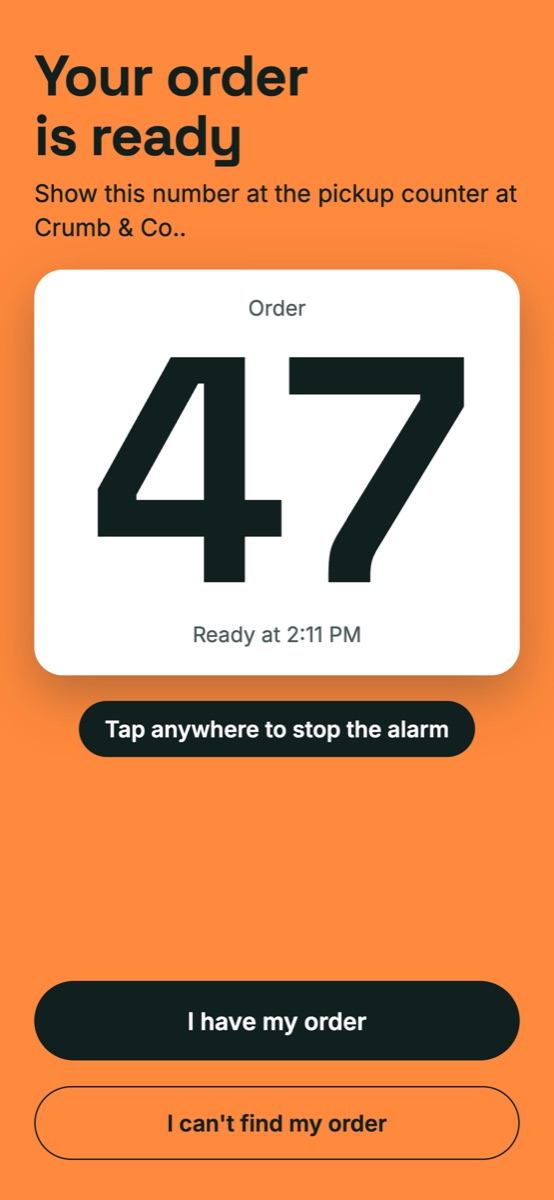
The phone rings and turns bright orange. If you have a counter screen, the number shows there too.
What you stop paying for
No buzzers to buy or rent
The customer's own phone is the buzzer. There is no kit to buy up front, no rental to pay, and no charging stack on the counter.
For scale: a 20-pager kit costs from about US$220 (Retekess TD163) to about US$1,100 (Long Range Systems), and each replacement coaster pager about US$44 (LRS at POSGuys). US retail prices, checked November 2026.
No lost or broken buzzers
Nothing walks out the door in a pocket, gets dropped, runs flat or needs wiping down between customers.
No line at the counter
Customers are free to leave the moment they scan. The counter stays clear for the people ordering.
No shouting numbers or names
Staff tap Ready once. Nobody calls out over the coffee machine, and nobody stands guard waiting to hear their name.
What Q does
- Works in the browser
- The QR opens a web page. Customers never install an app or create an account.
- Live status and a time estimate
- Preparing, ready, collected, with an estimate that updates from your kitchen's real pace.
- An alarm you hear in a busy room
- When the order is ready, the page goes full-screen orange and, with sound turned on, rings loudly until the customer touches it.
- Lock-screen alerts
- On Android today. For iPhone, a lock-screen alert is on the way; until then the page rings while it is open.
- One tap for staff
- Ready, collected and undo, from a tablet. It keeps working through a Wi-Fi drop and catches up when the connection is back.
- Counter display
- Optional: any TV can show the numbers that are ready for pickup.
- No POS integration
- Q runs next to the till you already have. Nothing to install on it.
See it at your counter
Tell us where you are and we will contact you to set a time and show Q working at your counter.
Pricing is covered in the demo.
Request sent
Thanks. We will contact you to set a time for the demo.
Questions owners ask
Do my customers need an app?
No. The QR opens a web page in the phone's browser. There is no app to install and no account to create.
Does it work on iPhone?
Yes, in Safari. The page shows the order live. One tap on "Turn on sound" lets it ring loudly when the order is ready and keeps the screen awake while the customer waits. A lock-screen alert for iPhone is on the way.
Do I have to change my POS?
No. Q runs next to your current till. Staff type the order number into Q, and that is the only extra step.
What do I need on the counter?
A printed Q card where customers pay, a tablet or screen in the back for staff, and Wi-Fi. A TV for the counter display is optional.
What does it cost?
We go through pricing during the demo, once we have seen how your counter runs.